Broadband help
For queries about your TalkTalk broadband service.
- Subscribe to RSS Feed
- Mark Topic as New
- Mark Topic as Read
- Float this Topic for Current User
- Bookmark
- Subscribe
- Mute
- Printer Friendly Page


22-04-2023 11:55 AM - edited 22-04-2023 12:08 PM
I have just upgraded to full fibre, with the TalkTalk Wi-Fi Hub 2, version SG4K100158, and am trying to reestablish the port forwarding i used with the previous router.
In the router GUI, i navigated to home / manage my devices / manage advanced settings, then selected the host i want to forward to from the list of wired ethernet devices.
On the device page, i selected the port forwarding / add rule tab and entered:
custom service name: nextcloud
service type: other (HTTPS forces both internal & external ports to 443)
protocol: TCP
external host: (left blank)
external port: 8443
internal port: 443
On selecting Add,I get the message "Operation could not complete, something wrong happened."
I also repeated the above with service type: HTTPS, which makes
both ports 443, with the same error message.
Notes:
1) I dont want to change the external port, as that would mean updating all my devices that sync to nextcloud!
2) I have changed the router address to 192.168.0.1
3) I have disabled the router's DHCP server, as I have one on my network already.
4) My local DHCP server uses dnsmasq, so also does DNS duty for the LAN.
can anyone help?
Answered! Go to Solution.
- Labels:
-
port forwarding
- Mark as New
- Bookmark
- Subscribe
- Mute
- Subscribe to RSS Feed
- Highlight
- Report Inappropriate Content

on 28-04-2023 12:51 PM
No problem, glad to help.
- Mark as New
- Bookmark
- Subscribe
- Mute
- Subscribe to RSS Feed
- Highlight
- Report Inappropriate Content
on 28-04-2023 12:01 PM
OK, I think that did it! The steps I followed were:
1) reset the router to factory defaults
2) login to router on 192.168.1.1
3) Attempt to setup the required port forward to 192.168.1.11 - accepted
4) Change router address to 192.168.0.1 with DHCP pool changed accordingly.
5) Reboot router & login again.
6) Change port forward to 192.168.0.11 - accepted
7) DISABLE router's DHCP server and power up my own.
😎 Restart my nextcloud server to pick up address 192.168.0.11
9) Check that my phone can now sync to nextcloud using the forwarded port - SUCCESS!
Incidentally, this also fixed a problem I was having with only being able to select DynDns as dynamic DNS provider - originally no others were listed, but now they are.
Thank you for your help Keith.
- Mark as New
- Bookmark
- Subscribe
- Mute
- Subscribe to RSS Feed
- Highlight
- Report Inappropriate Content
on 23-04-2023 03:02 PM
I will give that a try when I return home; I am away for work until next Friday.
- Mark as New
- Bookmark
- Subscribe
- Mute
- Subscribe to RSS Feed
- Highlight
- Report Inappropriate Content
on 23-04-2023 01:20 PM
I have just set this up & it worked the first time:-

Testing via a port checking website:-
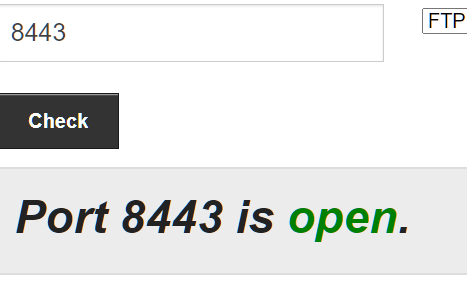
I did not get the "Operation could not complete, something wrong happened." error at all. I am running later firmware that is under test, but I never saw this error ever in V158 either. What happens if you do a factory reset of the Hub 2's configuration, does that get rid of the error?
- Mark as New
- Bookmark
- Subscribe
- Mute
- Subscribe to RSS Feed
- Highlight
- Report Inappropriate Content
on 22-04-2023 05:43 PM
Mine is the same hardware revision, so I will try & test it tomorrow afternoon.
- Mark as New
- Bookmark
- Subscribe
- Mute
- Subscribe to RSS Feed
- Highlight
- Report Inappropriate Content
on 22-04-2023 05:05 PM
Thanks for the response, Keith.
Hardware Version FAST5464 2.00
Software Version SG4K100158
GUI Version 5.79.4
- Mark as New
- Bookmark
- Subscribe
- Mute
- Subscribe to RSS Feed
- Highlight
- Report Inappropriate Content
on 22-04-2023 04:24 PM
That error is normally with the Hub 1 (Sagemcom FAST 5364) when it runs version 3.00 hardware, but I have not found this on the Hub 2 at all. What hardware revision is this running & I will test it out after I hear back from you.
- Mark as New
- Bookmark
- Subscribe
- Mute
- Subscribe to RSS Feed
- Highlight
- Report Inappropriate Content
on 22-04-2023 12:22 PM
I also tried different ports, e.g. 10443 -> 9443, and external host * instead of blank, with the same result.
- Mark as New
- Bookmark
- Subscribe
- Mute
- Subscribe to RSS Feed
- Highlight
- Report Inappropriate Content

- Internet dropping, unhepful support in Fibre
- Gmail is blocking forwarded emails specifically from Talk Talk customer service in Email
- Port Forwarding being blocked after working for months , network engineers new security? in Broadband
- Can Talk Talk ever fix my internet connection?? in Broadband
- Long term issue with faulty landline. in TV