email support
Ask us about your TalkTalk email account and Webmail.
- Subscribe to RSS Feed
- Mark Topic as New
- Mark Topic as Read
- Float this Topic for Current User
- Bookmark
- Subscribe
- Mute
- Printer Friendly Page
Old Samsung Tablet Email Settings



on 22-12-2023 11:17 AM
I have a Samsung SM-T560 tablet and cannot get it to connect to my email server. I have tried mail.talktalk.net, TLS, Port 993 but that does not work. Any advice?
- Labels:
-
@talktalk.net
-
IMAP
- Mark as New
- Bookmark
- Subscribe
- Mute
- Subscribe to RSS Feed
- Highlight
- Report Inappropriate Content

on 23-12-2023 10:20 AM
Try TLS, although you may find that the GMail version is too old. On Android, I prefer K-9 Mail which is now owned by Thunderbird.
- Mark as New
- Bookmark
- Subscribe
- Mute
- Subscribe to RSS Feed
- Highlight
- Report Inappropriate Content
on 23-12-2023 10:17 AM
These are the only security choices I get (see attached).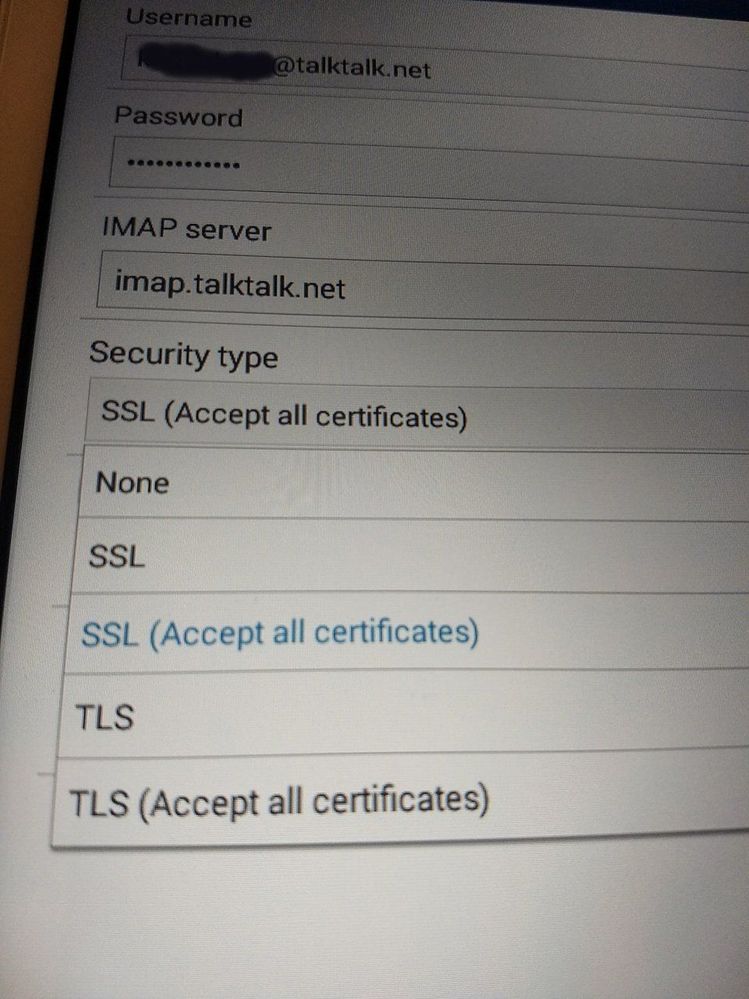
- Mark as New
- Bookmark
- Subscribe
- Mute
- Subscribe to RSS Feed
- Highlight
- Report Inappropriate Content
on 22-12-2023 09:56 PM
Your security type is wrong, as per my first screenshot it should be SSL/TLS.
- Mark as New
- Bookmark
- Subscribe
- Mute
- Subscribe to RSS Feed
- Highlight
- Report Inappropriate Content
on 22-12-2023 05:23 PM
I have attached the image of the first page of the setup (can't get to the smtp settings page because I get the message "Setup could not finish. Cannot safely connect to server."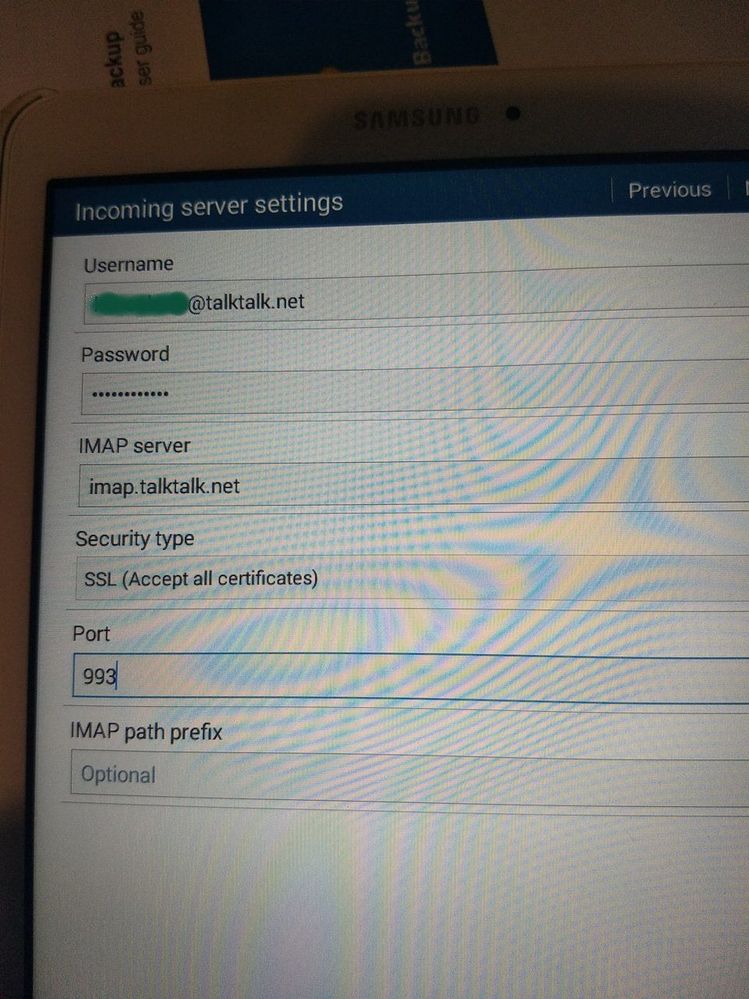
- Mark as New
- Bookmark
- Subscribe
- Mute
- Subscribe to RSS Feed
- Highlight
- Report Inappropriate Content
on 22-12-2023 03:20 PM
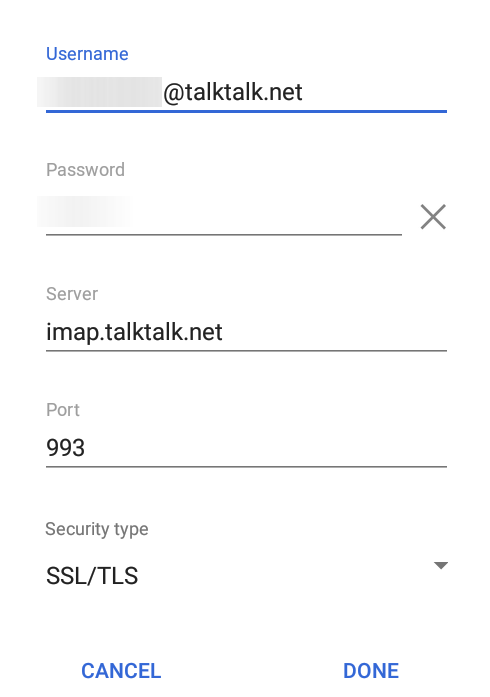
This is what you should be doing.
Use:-
Add Accounts > Other
Enter email address followed by:-
Manual Setup > Personal (IMAP)
Enter email password
Change incoming mail server to:-
imap.talktalk.net
Next
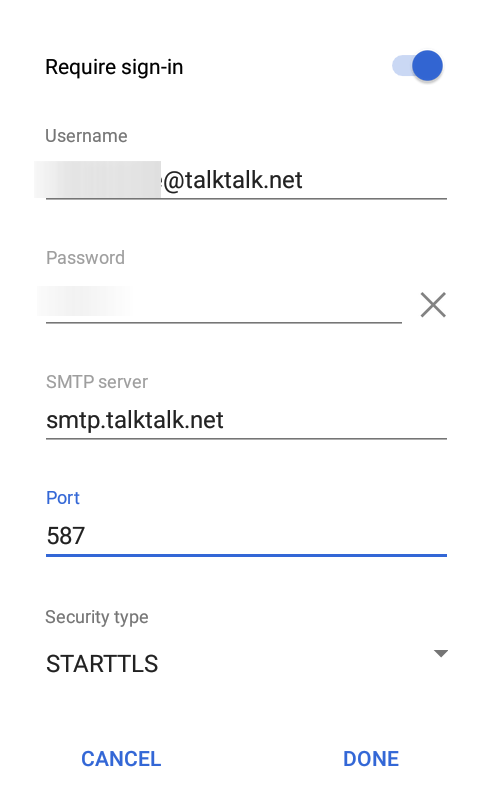
Outgoing Settings
Require sign in – On
SMTP server:-
smtp.talktalk.net
Then checking it, it should look like this:-
- Mark as New
- Bookmark
- Subscribe
- Mute
- Subscribe to RSS Feed
- Highlight
- Report Inappropriate Content
on 22-12-2023 03:13 PM
Please actually get the screenshots I cannot tell from your description if you have set up the username correctly & exactly which TLS setting are you trying to use? What about all the SMTP settings? I cannot help you without this. Just redact your email address & password.
- Mark as New
- Bookmark
- Subscribe
- Mute
- Subscribe to RSS Feed
- Highlight
- Report Inappropriate Content
on 22-12-2023 03:09 PM
I am using GMail. I have used the manual settings shown above.
- Mark as New
- Bookmark
- Subscribe
- Mute
- Subscribe to RSS Feed
- Highlight
- Report Inappropriate Content
on 22-12-2023 11:38 AM
What email app are you using? Please include screenshots of the email setup so as I can verify them for you.
- Mark as New
- Bookmark
- Subscribe
- Mute
- Subscribe to RSS Feed
- Highlight
- Report Inappropriate Content

- Dads email not working, Hacked, got locked out, 3 days later, password redone. emails not coming. in Email
- Connected without Internet... in Fibre
- Server settings to add a ... @tiscali.co.uk email to a Samsung A13 Android in Email
- Link email address to broadband account in Email
- Lineone emails stopped working via Outlook 2019 in Email