FIbre Support
Get expert support with your Fibre connection.
- Subscribe to RSS Feed
- Mark Topic as New
- Mark Topic as Read
- Float this Topic for Current User
- Bookmark
- Subscribe
- Mute
- Printer Friendly Page



on 03-03-2024 09:39 AM
Hi,
I'm trying to set up port forwardin settings for Synology NAS.
I know the external port but not the rest (se below) can anyone help?
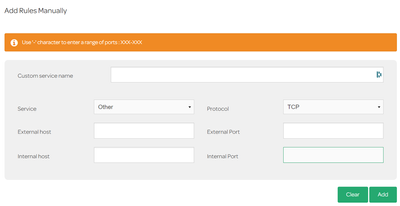
Answered! Go to Solution.
- Labels:
-
port forwarding
- Mark as New
- Bookmark
- Subscribe
- Mute
- Subscribe to RSS Feed
- Highlight
- Report Inappropriate Content

on 04-03-2024 06:59 AM
- Mark as New
- Bookmark
- Subscribe
- Mute
- Subscribe to RSS Feed
- Highlight
- Report Inappropriate Content
on 03-03-2024 06:01 PM
Perfect - thank you.
- Mark as New
- Bookmark
- Subscribe
- Mute
- Subscribe to RSS Feed
- Highlight
- Report Inappropriate Content

on 03-03-2024 03:37 PM
This works (assuming it is TCP), I have just tested it.

- Mark as New
- Bookmark
- Subscribe
- Mute
- Subscribe to RSS Feed
- Highlight
- Report Inappropriate Content
on 03-03-2024 03:30 PM
Thanks Keith: 5001
- Mark as New
- Bookmark
- Subscribe
- Mute
- Subscribe to RSS Feed
- Highlight
- Report Inappropriate Content
03-03-2024 01:05 PM - edited 03-03-2024 01:30 PM
What TCP or UDP ports do you need to forward to access your NAS?
- Mark as New
- Bookmark
- Subscribe
- Mute
- Subscribe to RSS Feed
- Highlight
- Report Inappropriate Content