FIbre Support
Get expert support with your Fibre connection.
- Subscribe to RSS Feed
- Mark Topic as New
- Mark Topic as Read
- Float this Topic for Current User
- Bookmark
- Subscribe
- Mute
- Printer Friendly Page
Wi Fi Connect


on 16-03-2024 08:43 PM
I have a WDTV Live multi media player that I can access to add, remove or edit the files using either of my 2 Win 11 Home Laptops whether the WDTV player was in Standby or On.
I have done nothing to my Black Hub or laptop network settings but unable to get a connection.
George
- Labels:
-
Wifi
- Mark as New
- Bookmark
- Subscribe
- Mute
- Subscribe to RSS Feed
- Highlight
- Report Inappropriate Content

on 18-03-2024 04:03 PM
I expect that Windows 11 may be making it harder to be able to use SMB V1, as it was they who pointed out how insecure it is now.
- Mark as New
- Bookmark
- Subscribe
- Mute
- Subscribe to RSS Feed
- Highlight
- Report Inappropriate Content
on 18-03-2024 04:01 PM
As the WDTV Live is still working in all parts except the Wireless connection, I can live without it. Thanks to all.
George
- Mark as New
- Bookmark
- Subscribe
- Mute
- Subscribe to RSS Feed
- Highlight
- Report Inappropriate Content
on 18-03-2024 03:19 PM
Hi @Pnokio
This uses the highly insecure protocol SMB V1 from what I can see. This should never be used because of this (stated by Microsoft). By default, SMB 1.0 is disabled in Windows 11 and 10 due to security vulnerabilities. Hence, if you really must use this, you must accept the insecurity it will bring & enable SMB 1.0 in the "Turn Windows features on or off" dialogue.
Have you looked at this site:-
https://www.sysprobs.com/how-to-connect-wd-tv-live-to-computer-windows-8-play-to
Go down to the section marked "How to Connect WD TV Live to Windows 10/11/8.1 Computer".
- Mark as New
- Bookmark
- Subscribe
- Mute
- Subscribe to RSS Feed
- Highlight
- Report Inappropriate Content
on 18-03-2024 03:04 PM
Yes, I have tried reboot but still no change.
George
- Mark as New
- Bookmark
- Subscribe
- Mute
- Subscribe to RSS Feed
- Highlight
- Report Inappropriate Content

on 18-03-2024 07:09 AM
Morning,
I'm sorry for the delay. Is this still not working? Have you tried rebooting the router and then re-connect again?
Thanks
Michelle
- Mark as New
- Bookmark
- Subscribe
- Mute
- Subscribe to RSS Feed
- Highlight
- Report Inappropriate Content
on 17-03-2024 04:55 PM
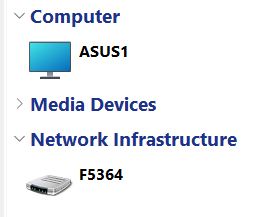
It worked perfectly a few days ago, when the WDTV equipment was powered on or on Standby using either laptop.
Now all I get is unable to connect. Wi Fi name and password are entered correctly.
This is all I get.
-
George
- Mark as New
- Bookmark
- Subscribe
- Mute
- Subscribe to RSS Feed
- Highlight
- Report Inappropriate Content
on 17-03-2024 01:36 PM
Has this ever worked? How are you trying to access this media player & what sort of error message do you get?
- Mark as New
- Bookmark
- Subscribe
- Mute
- Subscribe to RSS Feed
- Highlight
- Report Inappropriate Content