Broadband help
For queries about your TalkTalk broadband service.
- Subscribe to RSS Feed
- Mark Topic as New
- Mark Topic as Read
- Float this Topic for Current User
- Bookmark
- Subscribe
- Mute
- Printer Friendly Page
5ghz uni-2


on 25-11-2021 09:41 AM
Hi,
I’m just wondering if the TalkTalk routers support the 5ghz uni-2 channels. As I’m looking at optimising WiFi performance. Thanks in advance.
- Mark as New
- Bookmark
- Subscribe
- Mute
- Subscribe to RSS Feed
- Highlight
- Report Inappropriate Content

on 25-11-2021 10:17 AM
Hi NinjasUnite
WIFI optimisation has now been switched off.
Thanks
Debbie 🙂
- Mark as New
- Bookmark
- Subscribe
- Mute
- Subscribe to RSS Feed
- Highlight
- Report Inappropriate Content
on 25-11-2021 10:09 AM
Yes please Debbie
- Mark as New
- Bookmark
- Subscribe
- Mute
- Subscribe to RSS Feed
- Highlight
- Report Inappropriate Content
on 25-11-2021 10:04 AM
Hi NinjasUnite
Thanks Keith.
If you would like me to switch off WIFI optimisation then please let me know.
Debbie
- Mark as New
- Bookmark
- Subscribe
- Mute
- Subscribe to RSS Feed
- Highlight
- Report Inappropriate Content


25-11-2021 10:00 AM - edited 25-11-2021 10:00 AM
Have you had TalkTalk’s Wi-Fi optimisation disabled on your Sagemcom FAST5364 router? When this is enabled, as it is by default, it has the power to override any Wi-Fi configuration changes that you might make. Only TalkTalk can do this for you, you cannot do it yourself. If not, just request they disable this for you in your reply.
- Mark as New
- Bookmark
- Subscribe
- Mute
- Subscribe to RSS Feed
- Highlight
- Report Inappropriate Content
on 25-11-2021 09:58 AM
No problem, glad to help.
- Mark as New
- Bookmark
- Subscribe
- Mute
- Subscribe to RSS Feed
- Highlight
- Report Inappropriate Content
on 25-11-2021 09:58 AM
Cheers mate
- Mark as New
- Bookmark
- Subscribe
- Mute
- Subscribe to RSS Feed
- Highlight
- Report Inappropriate Content
on 25-11-2021 09:56 AM
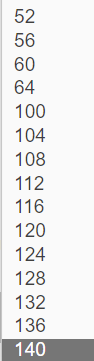
Then yes it does support middle & extended. This is the current firmware's channel range in UNI-11:-
- Mark as New
- Bookmark
- Subscribe
- Mute
- Subscribe to RSS Feed
- Highlight
- Report Inappropriate Content
on 25-11-2021 09:52 AM
@KeithFrench The router is a Sagemcom.
- Mark as New
- Bookmark
- Subscribe
- Mute
- Subscribe to RSS Feed
- Highlight
- Report Inappropriate Content
on 25-11-2021 09:52 AM
If you only want to use 52 - 64 then all TT dual band routers do, as these are the U-NII-2 Middle, most also support the Extended group from 100 - 140.
- Mark as New
- Bookmark
- Subscribe
- Mute
- Subscribe to RSS Feed
- Highlight
- Report Inappropriate Content
on 25-11-2021 09:50 AM
@Debbie-TalkTalk No. I mean so I can access channels 52, 56, 60 and 64. I can only access these if my router has DFC and TPC enabled.
- Mark as New
- Bookmark
- Subscribe
- Mute
- Subscribe to RSS Feed
- Highlight
- Report Inappropriate Content
on 25-11-2021 09:50 AM
- Mark as New
- Bookmark
- Subscribe
- Mute
- Subscribe to RSS Feed
- Highlight
- Report Inappropriate Content
25-11-2021 09:48 AM - edited 25-11-2021 09:49 AM
Yes, they do, whether they support the full range of U-NII-2 Extended may depend on which router you are talking about. Please note that not all devices support U-NII-2 Middle & Extended, as some network adapters do not include the DFS logic in them & if they don't, then they are not allowed to support channels 52 - 140.
- Mark as New
- Bookmark
- Subscribe
- Mute
- Subscribe to RSS Feed
- Highlight
- Report Inappropriate Content
on 25-11-2021 09:45 AM
Hi NinjasUnite
Do you mean split the SSID's and connect to the 5ghz channel?
- Mark as New
- Bookmark
- Subscribe
- Mute
- Subscribe to RSS Feed
- Highlight
- Report Inappropriate Content
