Broadband help
For queries about your TalkTalk broadband service.
- Subscribe to RSS Feed
- Mark Topic as New
- Mark Topic as Read
- Float this Topic for Current User
- Bookmark
- Subscribe
- Mute
- Printer Friendly Page
How to reboot a TalkTalk DG8041W from a BROWSER


on 11-12-2021 01:08 PM
Recently installed this TalkTalk DG8041W running TalkTalk Wi-Fi Hub
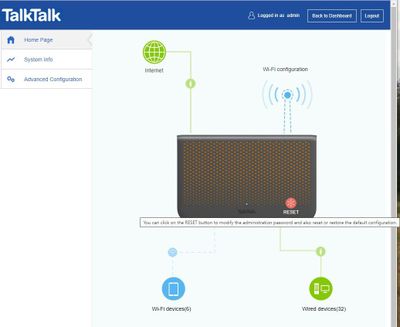
Version v1.05t. Can obviously switch off unit from the back or switch off at wall but how to reboot via PC web browser please? A manual/user guide would also help. Alternatively does any one know what the Reset button does in the dashboard?
- Labels:
-
Router
- Mark as New
- Bookmark
- Subscribe
- Mute
- Subscribe to RSS Feed
- Highlight
- Report Inappropriate Content

on 13-12-2021 10:09 AM
Morning,
Thanks for confirming 🙂
Thanks
- Mark as New
- Bookmark
- Subscribe
- Mute
- Subscribe to RSS Feed
- Highlight
- Report Inappropriate Content
on 13-12-2021 10:08 AM
All good now thanks.
- Mark as New
- Bookmark
- Subscribe
- Mute
- Subscribe to RSS Feed
- Highlight
- Report Inappropriate Content
on 13-12-2021 08:21 AM
Hello,
Do you still need any assistance with this?
Thanks
- Mark as New
- Bookmark
- Subscribe
- Mute
- Subscribe to RSS Feed
- Highlight
- Report Inappropriate Content
on 11-12-2021 03:08 PM
Ta much. The box is new to me and I wanted to make sure that devices I have assigned as static are correct. Also my previous box, a TalkTalk DSL-3680 would lock me out after 30 minutes or so and in order to change configuration I would need reboot it so a bad habit.
- Mark as New
- Bookmark
- Subscribe
- Mute
- Subscribe to RSS Feed
- Highlight
- Report Inappropriate Content


on 11-12-2021 02:48 PM
It is an option, the reset button you pictured needs further choices once clicked. May I ask why you need to reboot anyway? Regular reconnections are likely to cause DLM to slow down your service.
- Mark as New
- Bookmark
- Subscribe
- Mute
- Subscribe to RSS Feed
- Highlight
- Report Inappropriate Content
on 11-12-2021 02:00 PM
Indeed so I'm a bit reluctant to try it to reboot in case it resets my configurations.
- Mark as New
- Bookmark
- Subscribe
- Mute
- Subscribe to RSS Feed
- Highlight
- Report Inappropriate Content
on 11-12-2021 01:55 PM
Ah, OK, that gives you series of options including the "nuclear" one of going back to factory defaults!
- Mark as New
- Bookmark
- Subscribe
- Mute
- Subscribe to RSS Feed
- Highlight
- Report Inappropriate Content
on 11-12-2021 01:47 PM
Excellent. Dunno why its so buried. The "Reset button" I was referring to is in Manage advanced settings > Home Page per screen grab with text.
- Mark as New
- Bookmark
- Subscribe
- Mute
- Subscribe to RSS Feed
- Highlight
- Report Inappropriate Content
on 11-12-2021 01:16 PM
There isn't a Reset button in the Dashboard as far as I can see? To restart via the web interface click on See internet settings > Manage advanced settings > System Info > DSL Information > Restart DSL.
- Mark as New
- Bookmark
- Subscribe
- Mute
- Subscribe to RSS Feed
- Highlight
- Report Inappropriate Content