FIbre Support
Get expert support with your Fibre connection.
- Subscribe to RSS Feed
- Mark Topic as New
- Mark Topic as Read
- Float this Topic for Current User
- Bookmark
- Subscribe
- Mute
- Printer Friendly Page
Resetting an additional router's password.



on 23-03-2024 10:09 PM
Hi all,
I've been given a spare TalkTalk WiFi Hub (Device Version DG8041W-2 T5) but I can't access the 192.168.1.1 admin page as the previous owner seems to have changed the password or username. I want to add the hub to my existing network hub (FAST 5364-2 T8) as a range extender for some smart plugs. I tried a factory reset, without success. I CAN connect anything I want to the hub (wirelessly or wired) and can access the internet through it perfectly, I just want to be able to perform some security maintenance.
I cannot ask the previous owner for the details for two reasons, a) to say she had the memory of a sieve, would be an understatement, and, unfortunately b) she died last month.
Any suggestions?
- Mark as New
- Bookmark
- Subscribe
- Mute
- Subscribe to RSS Feed
- Highlight
- Report Inappropriate Content

on 25-03-2024 03:21 PM
No problem, sorry we couldn't help further
Chris
Chris, Community Team
Our latest Blog l Share your Ideas l Service Status l Help with your Service l Community Stars l Set your preferences
- Mark as New
- Bookmark
- Subscribe
- Mute
- Subscribe to RSS Feed
- Highlight
- Report Inappropriate Content
on 25-03-2024 03:13 PM
Hi again,
It's a bit disappointing, but I think you're probably right. I guess the hub's just e-waste now, I'll have to save up for a replacement.
Many thanks for everyone's help.
Tarl.
- Mark as New
- Bookmark
- Subscribe
- Mute
- Subscribe to RSS Feed
- Highlight
- Report Inappropriate Content
on 25-03-2024 03:06 PM
That doesn't sound right, if the light is white it's showing the router is connected to the internet so we would expect the connection to drop for a short time, perhaps the router is faulty
Chris
Chris, Community Team
Our latest Blog l Share your Ideas l Service Status l Help with your Service l Community Stars l Set your preferences
- Mark as New
- Bookmark
- Subscribe
- Mute
- Subscribe to RSS Feed
- Highlight
- Report Inappropriate Content
on 25-03-2024 02:42 PM
Hi Chris,
Just pressed the reset button for about 40 seconds and tried to access the admin site without any luck. One thing I did notice though, when I pressed the button, the broadband light stayed on throughout, only flickering off then straight to white when I released the button. Is this normal? I did feel the button 'click' when pressed.
- Mark as New
- Bookmark
- Subscribe
- Mute
- Subscribe to RSS Feed
- Highlight
- Report Inappropriate Content
on 25-03-2024 02:34 PM
OK, no problem
Chris
Chris, Community Team
Our latest Blog l Share your Ideas l Service Status l Help with your Service l Community Stars l Set your preferences
- Mark as New
- Bookmark
- Subscribe
- Mute
- Subscribe to RSS Feed
- Highlight
- Report Inappropriate Content
on 25-03-2024 02:31 PM
Hi Chris,
Many thanks for that, I'll give the factory reset another go and see if it was just me being a bit dim.
Tarl.
- Mark as New
- Bookmark
- Subscribe
- Mute
- Subscribe to RSS Feed
- Highlight
- Report Inappropriate Content
on 25-03-2024 02:14 PM
Hi Tarl72,
Resetting the router to factory default settings should reset the router password. I don't really know what else to suggest, ordinarily in this situation if resetting the router doesn't resolve the issue we would just send a replacement
Chris
Chris, Community Team
Our latest Blog l Share your Ideas l Service Status l Help with your Service l Community Stars l Set your preferences
- Mark as New
- Bookmark
- Subscribe
- Mute
- Subscribe to RSS Feed
- Highlight
- Report Inappropriate Content
25-03-2024 01:40 PM - edited 25-03-2024 01:44 PM
Hi,
Yes, that's correct. 'my' one works perfectly, but the additional one doesn't (ish!). I can connect through it to the internet, but can't connect to the management site (192.168.1.1). I know it's not under any kind of warranty, but I'd love to be able to get the password(s) updated as I don't know who else, other than my friend, had them.
- Mark as New
- Bookmark
- Subscribe
- Mute
- Subscribe to RSS Feed
- Highlight
- Report Inappropriate Content

on 25-03-2024 01:31 PM
Hello,
Can I just confirm, your original TT router is working fine but the router you received from a friend won't work?
Michelle
- Mark as New
- Bookmark
- Subscribe
- Mute
- Subscribe to RSS Feed
- Highlight
- Report Inappropriate Content
on 25-03-2024 01:28 PM
Hi Michelle,
Unfortunately, I've hit a brick wall. When I tried swapping the hub I could access any site I wanted, except 192.168.1.1 I tried restarting the router and my PC and doing a fresh factory reset, but eventually gave in. I'm just hoping I don't get hacked lol.
Tarl.
- Mark as New
- Bookmark
- Subscribe
- Mute
- Subscribe to RSS Feed
- Highlight
- Report Inappropriate Content
on 25-03-2024 07:42 AM
Morning,
How are you getting on?
Michelle
- Mark as New
- Bookmark
- Subscribe
- Mute
- Subscribe to RSS Feed
- Highlight
- Report Inappropriate Content

on 24-03-2024 12:12 AM
OK, maybe try using it as the single/primary router to get the login sorted?
- Mark as New
- Bookmark
- Subscribe
- Mute
- Subscribe to RSS Feed
- Highlight
- Report Inappropriate Content
on 23-03-2024 11:39 PM
Hi there,
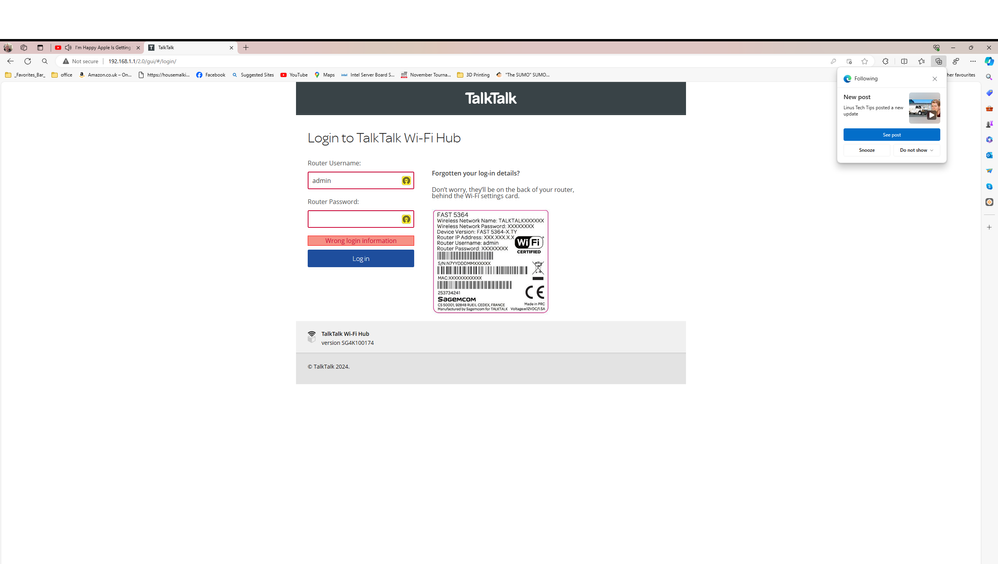
Unfortunately, it didn't work. I just get a message that the "credentials do not match". I'm thinking that the admin password is stored on the TT server, rather than on the hub itself(?).
Could it be a problem with me having a Fast hub as well as this one?
- Mark as New
- Bookmark
- Subscribe
- Mute
- Subscribe to RSS Feed
- Highlight
- Report Inappropriate Content
on 23-03-2024 10:44 PM
If you can do a factory reset of the router it should default back to the username and password as printed on the label on the back.
- Mark as New
- Bookmark
- Subscribe
- Mute
- Subscribe to RSS Feed
- Highlight
- Report Inappropriate Content