NEED SOME HELP?
We’re here 24/7. 365 days a year.
Ask questions. Find your answers. Connect.
- Subscribe to RSS Feed
- Mark Topic as New
- Mark Topic as Read
- Float this Topic for Current User
- Bookmark
- Subscribe
- Mute
- Printer Friendly Page
Packet Loss on FTTP



on 01-02-2024 10:16 PM
Hi All
I have recently been connected to FTTP in December and ever since I am finding it very difficult to play online games due to a mysterious 'input lag'.
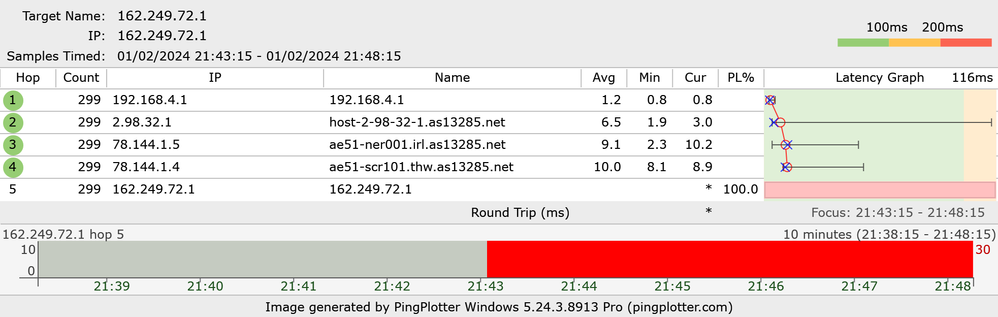
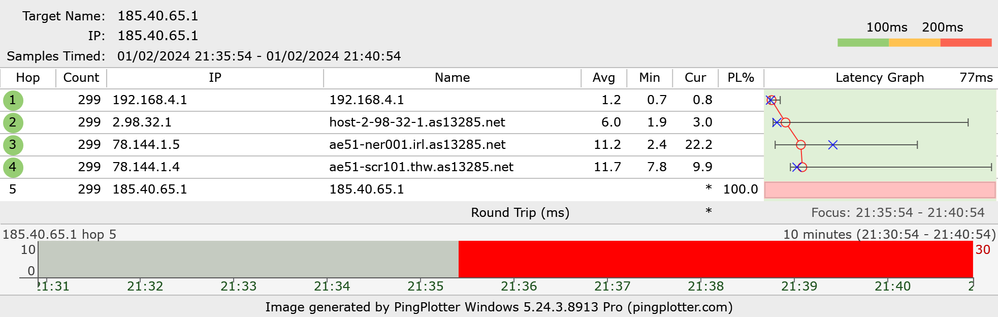
This week I have been in contact with Riot Games who have asked me to carry out a few tests, after using a program called pingplotter as suggested I seem to be getting high packet loss based off the results. The download speeds seem to be perfect & ping seems to be find but the latency is just horrendous when trying to play online.
I was wondering if anyone else has had this issue before when moving from FTTC to FTTP? the online checker does say there is an issue with my line but after a few days the ticket just gets closed with no updates which I have done a few times now.
My current setup is 2x eero 6 pro's connected to one another via ethernet then from the second eero to my pc also by ethernet, I have also tried a custom router which only provides the same results so surely must be an issue with the line.
Anyway, some advise would be grateful as the Talktalk support keep closing my tickets with no results!
Thanks 🙂
- Labels:
-
Congestion
-
Connection
-
Gaming
-
Latency
-
Stability
- Mark as New
- Bookmark
- Subscribe
- Mute
- Subscribe to RSS Feed
- Highlight
- Report Inappropriate Content

on 07-02-2024 12:57 PM
Hi Thecreator,
Could you switch the ONT and eero off for 30 minutes again please then switch back on and retest. If there's no improvement I'll escalate it to our further fibre team
Chris
Chris, Community Team
Our latest Blog l Share your Ideas l Service Status l Help with your Service l Community Stars l Set your preferences
- Mark as New
- Bookmark
- Subscribe
- Mute
- Subscribe to RSS Feed
- Highlight
- Report Inappropriate Content
on 06-02-2024 03:04 PM
Hi Chris
Just been on the live chat again as I don’t even think openreach ended up going to the exchange, they have advised me that they will look into it more.
However, just now I have noticed the ticket has been closed as the issue resolved when it clearly isn’t.
What nobody seems to be grasping is that I have 100% packet loss, when testing download speeds etc the line looks perfectly normal so they won’t see that.
Is there anyway we can get this escalated? Or even so if there’s a contact for openreach I could talk to myself? It’s been going on for nearly 2 months now and is becoming quite frustrating. Even when I go on the line tester it still states there’s an issue with my line so how this isn’t being picked up is beyond me.
Any help would be appreciated! 🙂
- Mark as New
- Bookmark
- Subscribe
- Mute
- Subscribe to RSS Feed
- Highlight
- Report Inappropriate Content
on 05-02-2024 09:36 AM
OK, please let us know how you get on
Chris
Chris, Community Team
Our latest Blog l Share your Ideas l Service Status l Help with your Service l Community Stars l Set your preferences
- Mark as New
- Bookmark
- Subscribe
- Mute
- Subscribe to RSS Feed
- Highlight
- Report Inappropriate Content
on 05-02-2024 09:33 AM
Hi Chris
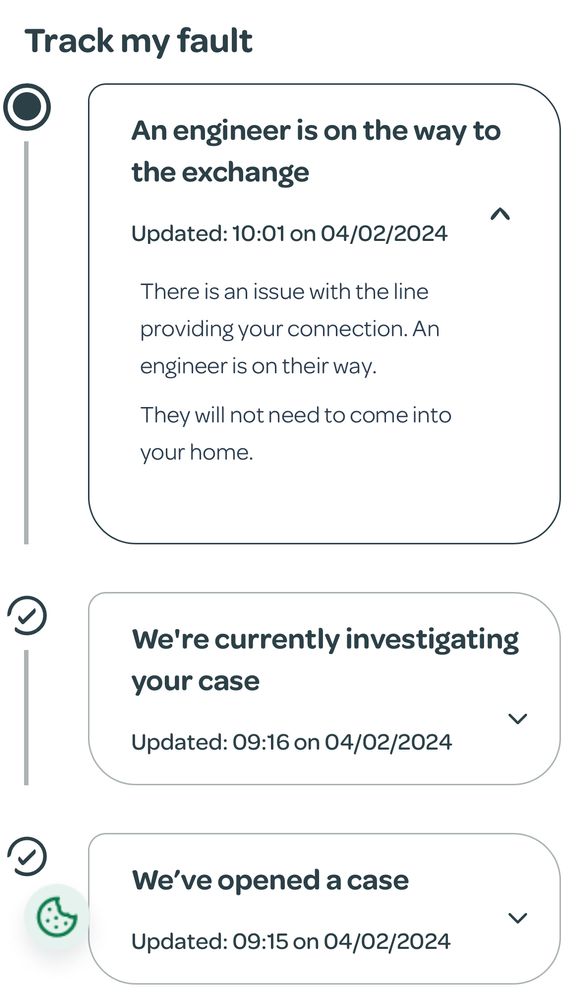
Sadly no improvement, I have however been updated by the line checker that an openreach engineer will be attending to look at the exchange so hopefully this resolves the issue!
- Mark as New
- Bookmark
- Subscribe
- Mute
- Subscribe to RSS Feed
- Highlight
- Report Inappropriate Content
on 05-02-2024 08:23 AM
OK thanks. How has it been over the weekend, has there been any improvement?
Chris
Chris, Community Team
Our latest Blog l Share your Ideas l Service Status l Help with your Service l Community Stars l Set your preferences
- Mark as New
- Bookmark
- Subscribe
- Mute
- Subscribe to RSS Feed
- Highlight
- Report Inappropriate Content
on 02-02-2024 03:30 PM
Hi Chris
to be honest I don’t know what they were on about either, I have updated my profile 🙂
- Mark as New
- Bookmark
- Subscribe
- Mute
- Subscribe to RSS Feed
- Highlight
- Report Inappropriate Content
on 02-02-2024 03:20 PM
Sorry, don't know what they mean by a firmware update on the line. Can you please add your TalkTalk home telephone number or account number to your community profile and we'll take a look at this for you
Chris
Chris, Community Team
Our latest Blog l Share your Ideas l Service Status l Help with your Service l Community Stars l Set your preferences
- Mark as New
- Bookmark
- Subscribe
- Mute
- Subscribe to RSS Feed
- Highlight
- Report Inappropriate Content
on 02-02-2024 11:36 AM
Hi Chris
Thanks for the reply! I have tried as you suggested but unfortunately no changes.
I have spoken to the tech team on the chat and they have advised there is something wrong with the line and in the end mentioned the line on their end needed a firmware update.
Do you have an idea what they would mean by a firmware update on the line? Since this has been actioned I have rebooted everything again but unfortunately still no changes.
I was wondering if it could be the eero devices so have tried my Draytek but still the same issues so I’m not sure if it’s the physical line that’s got an issue?
Any help or advise would be appreciated.
- Mark as New
- Bookmark
- Subscribe
- Mute
- Subscribe to RSS Feed
- Highlight
- Report Inappropriate Content
on 02-02-2024 08:15 AM
Hi Thecreator,
Could you first of all switch the ONT and eero's off and leave them off for at least 30 minutes, then switch back on and retest. Please let us know how you get on
Chris
Chris, Community Team
Our latest Blog l Share your Ideas l Service Status l Help with your Service l Community Stars l Set your preferences
- Mark as New
- Bookmark
- Subscribe
- Mute
- Subscribe to RSS Feed
- Highlight
- Report Inappropriate Content

- « Previous
-
- 1
- 2
- Next »